Federal Tax Step Import
Maintenance > Human Resources > Deductions and Benefits > Federal Tax Step Import
The Federal Tax Step Import eliminates the need to update your federal tax steps table manually.
On this page, the New World ERP development team has built the federal tax steps table for the current tax year. When the IRS publishes the tax steps for the next year, the development team will update this page accordingly.
 Setup
User Permissions
Setup
User Permissions
For the Federal Tax Step Import to display on a user's menu, follow the steps below:
- Navigate to Maintenance > new world ERP Suite > Security > Users. The User List displays.
- Use the filter in the User Name column to search for the user.
- Select the user's row.
- Click Permissions. The User Permissions page displays, containing a table of security components and a filter panel.
-
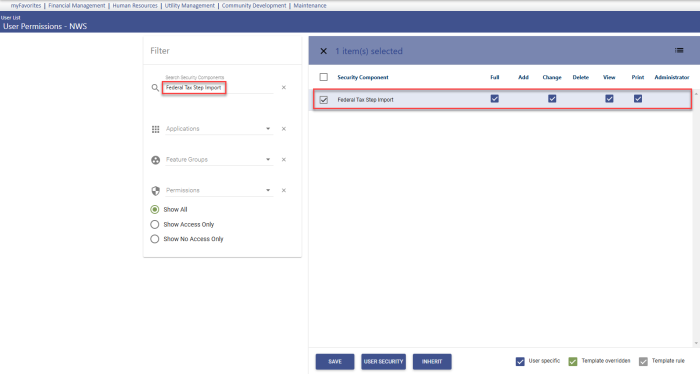
In the Search Security Components filter, type Federal Tax Step Import. The table refreshes to display the Federal Tax Step Import security component:
- Select the appropriate permissions.
- Click Save.
- For the permissions to take effect, the user must log off and log back onto the system.
Withholding Status Alternate Values
The federal tax steps on the import page are based on six standard withholding tables defined by alternate values in the Withholding Status validation set. They are the same alternate values used for the W-4 update from eSuite.
If alternate values have not been set up already, follow the steps below, making entries exactly as shown:
- Navigate to System > Validation Sets > Validation Set List.
- Select the row containing Set Number 11, Withholding Status.
- Click the Values button. The Validation Set Values List page opens.
- Select the row containing a federal withholding status.
- Click the Alternates button. The Alternate Value List page opens.
- Click the New button. The Alternate Value dialog opens.
-
Select the Usage Type, NWS Quick Value.
- In the Value field, type an M.
- In the Description field, type Married.
- Click OK.
-
Repeat steps 4-10 for the following withholding statuses, using the same Usage Type of NWS Quick Value:
Alternate Value Description (Status) M Married S Single H Head of Household M2 Married 2 Jobs S2 Single 2 Jobs H2 HOH 2 Jobs
Federal Tax Setup
- Navigate to Maintenance > Human Resources > Deductions and Benefits > Taxes.
-
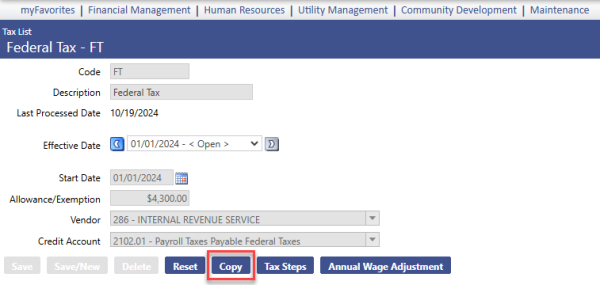
Click the Code of the federal tax you are updating. A page like the following displays:
-
Click Copy to create a new Effective Date that is later than the Last Processed Date. The Copy Effective Date dialog displays:
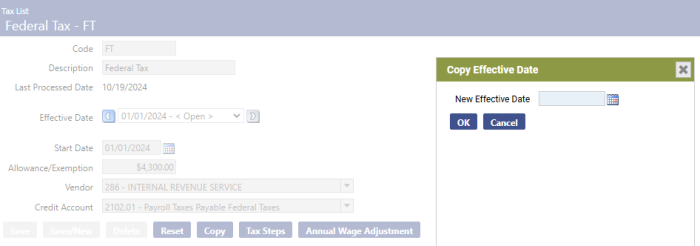
- Select the New Effective Date.
- Click OK.
- If necessary, update the amount in the Allowance/Exemption field.
-
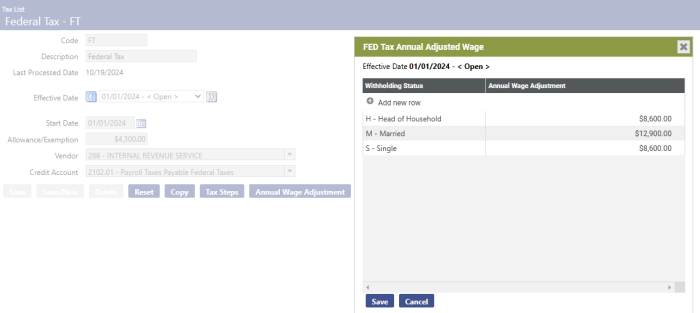
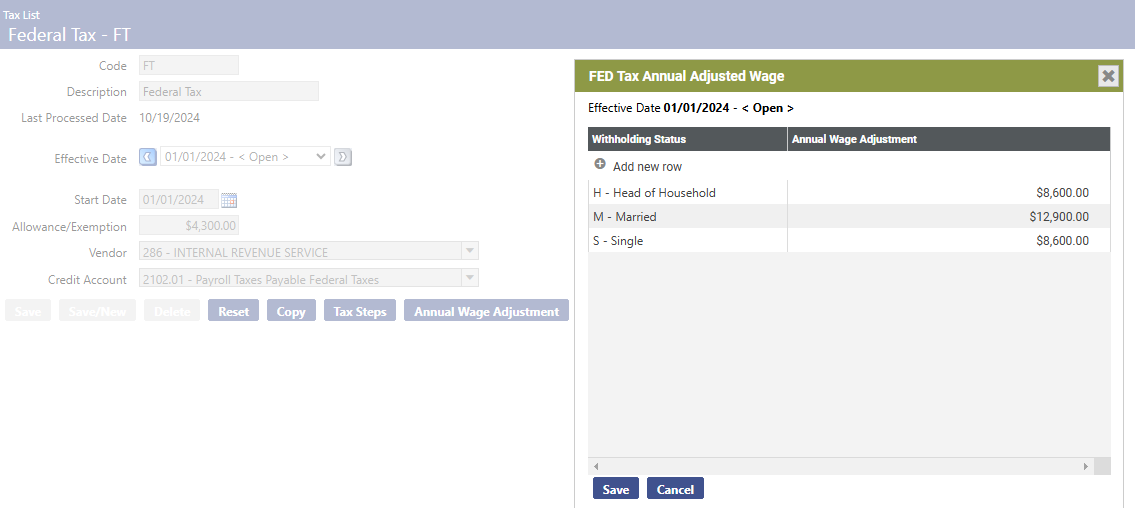
Click Annual Wage Adjustment to update the annual adjusted wage, if necessary:
Note: If your Federal Tax Step Import List is missing any federal tax withholding statuses, please supply the alternate values to validation set 11, Withholding Status (see Setup section above). Once that is complete, return to the Federal Tax Step Import List and click the Rebuild button at the bottom of the page to rebuild the import steps.
Once you have performed the necessary setup, select the federal Tax Code to update, and click Import.
The following message displays, asking you to confirm whether you want to import the tax steps:
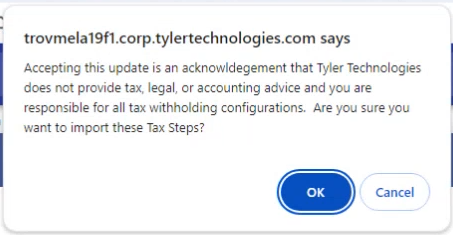
When you click OK, the tax steps are imported to the federal tax steps page for the tax code selected (Maintenance > Human Resources > Deductions and Benefits > Taxes > Code > Tax Steps):
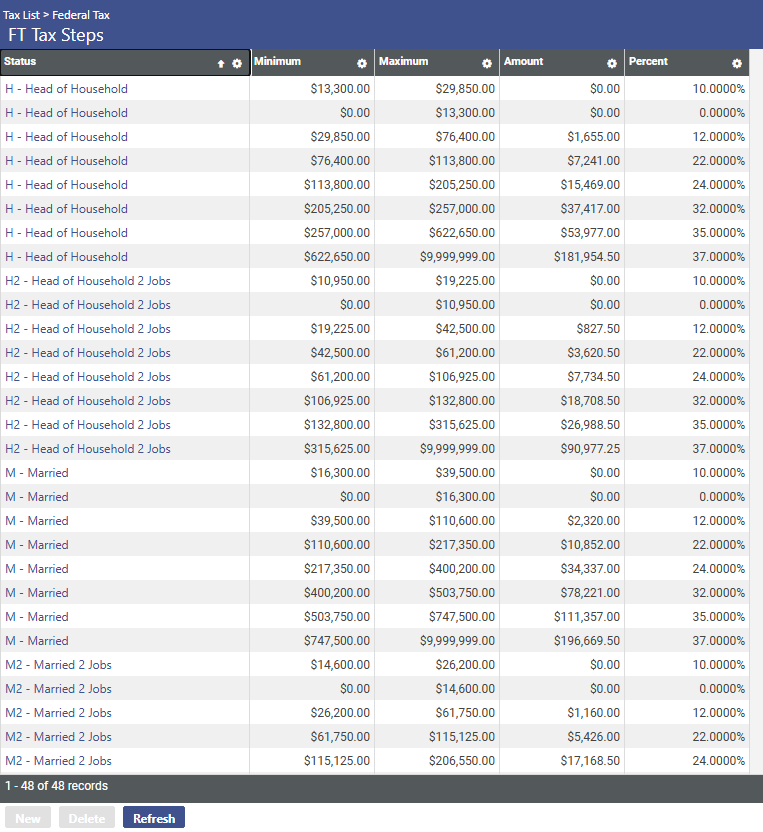
Before the imported steps are used in a payroll, you may edit the table as necessary; however, if you run the import again, the imported table overrides the existing table.